
Skills for AI Agents
Create reusable skills in the Library to give your AI agents standardized instructions and workflows for performing tasks consistently across multiple agents.
Skills give agents reusable capabilities or instructions. They extend your agents' capabilities and enable them to perform specific tasks. Skills can be used by multiple agents or assigned directly to a single agent.
Key benefits and use cases
A skill is a collection of instructions and additional information that describes how to perform a specific task. This lets you standardize recurring processes.
For example, skills can:
- Set a writing style: Specify particular wording or a communication style
- Define workflows and describe a fixed sequence of steps
- Standardize evaluations: Set criteria and rating systems
- Define templates and procedures: Create results in a predefined structure
- Provide knowledge, for example through PDFs or other files
- Connect external systems, for example through scripts, code, routines, or APIs
Example: Determine bug severity
A skill can define a standardized process for assessing bugs. It can specify how to determine severity, which criteria to use, what information to add to the task, and which icon or label to use.
Create skills in the Library
-
Open the Library
- Through Einstellungen (gear icon at the bottom left of the main menu) > Library
- Or open the AI section in the main menu on the left and click the Library button in the top right
-
Select the Skills section
Select Skills in the Library's left-hand navigation. Here you can see all existing skills and create new ones.
Create a new skill
-
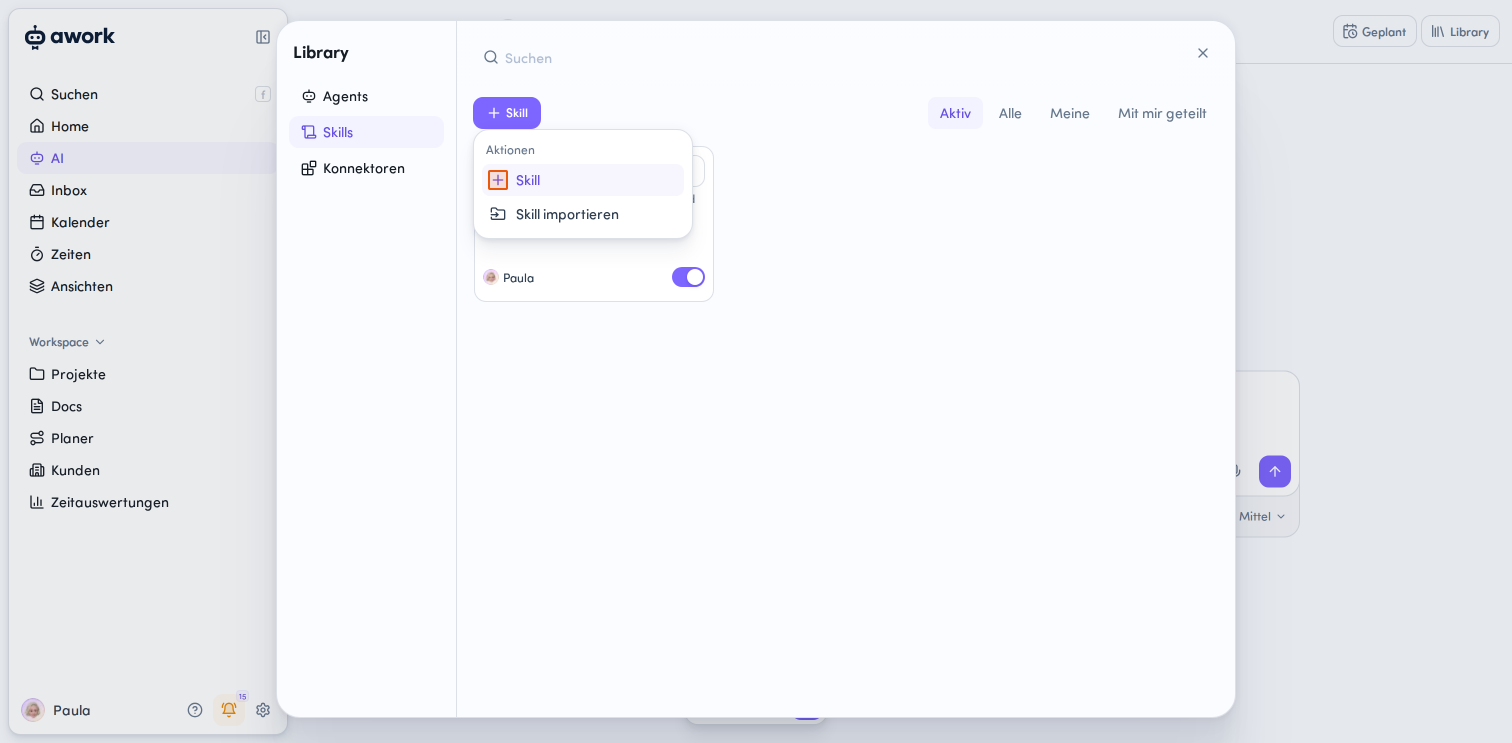
Click the + Skill button
-
Select the + Skill action
-
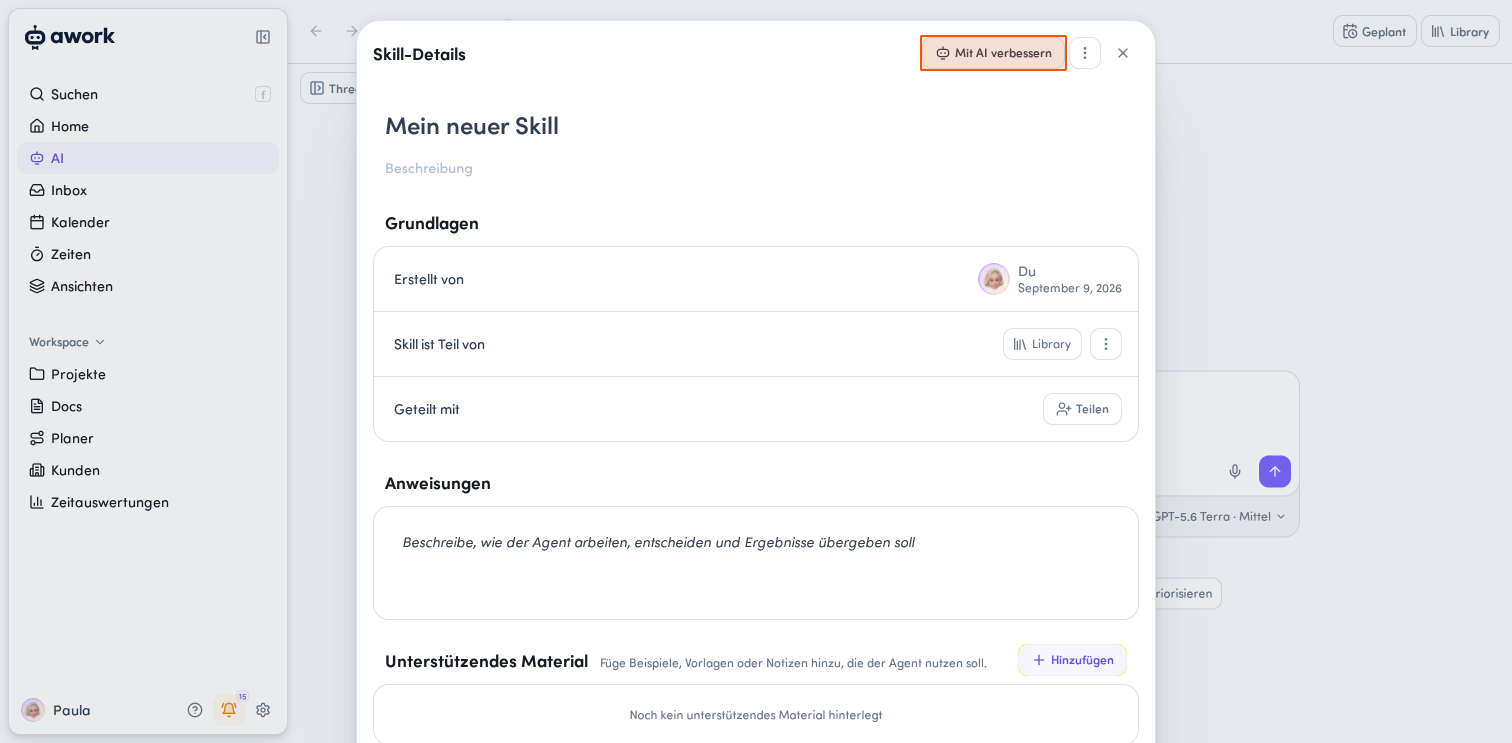
Create and edit the skill. Changes to skill details are saved automatically. There is no standard Save button.
In the Skill-Details window, you can add the following, among other things:
-
Anweisungen: Describe how the agent should work on the task, make decisions, and deliver results.
-
Unterstützendes Material: Click + Hinzufügen to add examples, templates, notes, PDFs, and knowledge sources. This content can serve as a knowledge base for the agent when it runs the skill.
-
Zugangsdaten: Give agents access to external systems or APIs. Click + Hinzufügen to configure the credentials the skill needs to access external systems or APIs, without exposing them.
Tip: Improve skills with AI
You can get help from awork AI when creating and optimizing a skill. To do so, click Mit AI verbessern in the top-right corner of the skill details. This starts a guided AI conversation that takes the existing skill and, if applicable, its associated agent into account. The conversation clarifies the changes you want and suggests a revised configuration. The changes are only applied after you approve them. The saved configuration is then checked, and any remaining issues are reported.
Import skills
You can import existing skills into awork. Your file must follow a specific structure.
Please note: A ZIP file contains exactly one skill. You can't import multiple skills together in a single ZIP file.
How to import a skill
-
Click + Skill.
-
Select Skill importieren.
-
Import the data either as a ZIP package containing all the information, including the description and additional files, or as a standalone Markdown file.
A Markdown import can't include additional files. If your skill needs additional files, import it as a ZIP package.
Newly created skills are private by default.
Markdown file requirements
If you import a skill as a single Markdown file, the following requirements apply:
- Encoding: The file must be UTF-8 encoded.
- File size: Maximum 1 MB.
- YAML front matter: The file must include a YAML front matter block, as is standard for
SKILL.md, with the required fieldsnameanddescription. name: Maximum 64 characters. Only lowercase letters, numbers, and single hyphens are allowed. The name can't start or end with a hyphen.description: Maximum 1,024 characters.compatibility(optional): If provided, the field can't be empty and must be no more than 500 characters.
The naming rules for ZIP imports are less strict than those for Markdown imports.
If an import is invalid, the error description will appear in a toast notification.
ZIP file requirements
For awork to import your skill, the ZIP file must meet the following requirements:
- File name: The file containing the skill instructions must be named exactly
SKILL.md. - File location: You can place
SKILL.mddirectly in the ZIP file's root directory or inside a single parent folder. - Additional files: You can include other files the skill needs. If you use a parent folder, all files must be inside that folder.
- One skill per ZIP: Each ZIP file can contain only one skill.
Import multiple skills
To import multiple skills, create a separate ZIP file for each skill.
A ZIP file containing multiple skill folders, such as skill-a/SKILL.md and skill-b/SKILL.md, isn't supported as a bulk import. Import the skills individually instead.
Add credentials for an API or external tool
A skill can be given external credentials, for example to access an API. To do so, click + Hinzufügen in the Zugriffsdetails section of the skill details. Then configure access in the Zugangsdaten hinzufügen dialog.
- Name des Zugriffs: Enter the API or tool name
- Zugangsdaten zur Nutzung des Skills erforderlich: Specify whether users need to authenticate to use the skill.
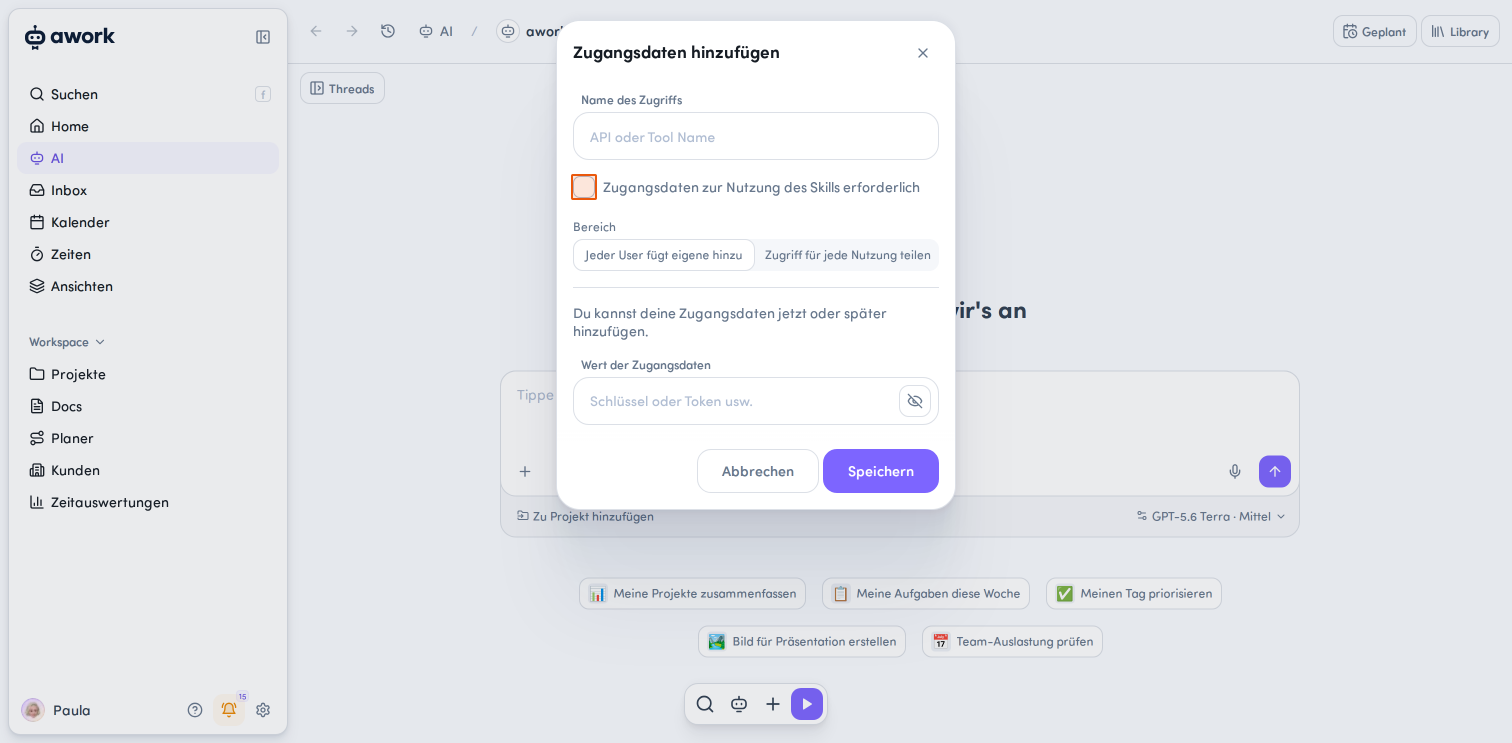
- Bereich: Choose between two options:
- Jeder User fügt eigene hinzu: Each user must add their own authentication details. Their credentials remain private.
- Zugriff für jede Nutzung teilen: The configured access can be used by multiple users. The secret itself isn't visible to other users.
- Wert der Zugangsdaten: Enter the key, token, or other secret.
Click Speichern to save the credentials, or Abbrechen to cancel.
Important: Saved credentials can't be viewed again later. You can delete a saved secret and add a new one if needed.
Manage skills in the Library
Filter the view
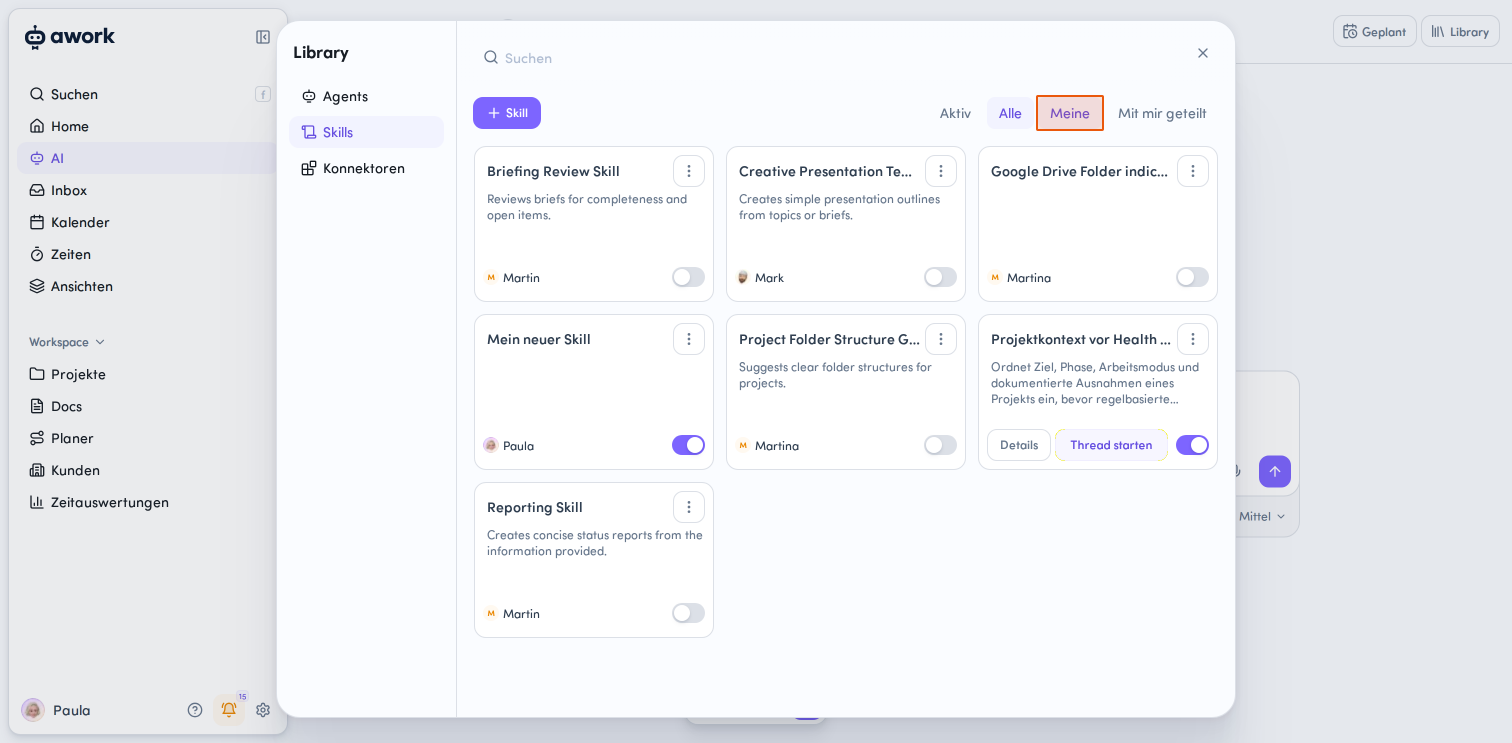
Use the tabs above the skill cards to filter the view:
- Aktiv: Shows your activated skills
- Alle: Shows all available skills
- Meine: Shows the skills you created
- Mit mir geteilt: Shows skills other users have shared with you
You can also access skills directly from an active agent chat. In the input area, click the + Button > Skills > In Library verwalten. Skills belonging to that agent are marked with a badge, for example, Konfiguration von Project Planner angewendet
Start a thread
Hover over a skill card and click the Thread starten button. A new AI thread will start with that skill.
Edit a skill
Hover over a skill card and click the Details button in the bottom-left corner, or click Bearbeiten in the action button at the top right. The full skill details will open for editing.
Available actions for each skill
Click the action button in the top-right corner of a skill card or, when the skill details are open, in the top-right corner of that panel to access more actions:
- Skill-Link kopieren: Share the skill with others
- Exportieren: Export the skill details
- Duplizieren: Create a copy of the skill
- Teilen: Configure access permissions for the skill
- Löschen: Delete the skill
Share a skill
In the sharing dialog, you can choose who can access the skill:
- Allgemeiner Zugriff: Choose whether and how your organization can access the skill
- Individueller Zugriff: Click User oder Team hinzufügen to add individual users or teams
- Zugriffsrechte: Choose between Keine, Lesen und verwenden, or Verwalten
Duplicate a skill
You can duplicate a skill in three places:
- In the Agent Library, using the action menu on a skill card
- In an agent's Skills tab, using the action menu
- In the open skill details, using the action menu in the top-right corner
Requirements: You don't need edit permission for the source skill, but you do need access to it, either directly or through an agent it's assigned to, as long as you have permission to view that agent. You also need permission to create skills.
What gets copied: The description, instructions, metadata, supporting files, and definitions of required secrets.
What isn't copied: Actual credentials, shares, and other access permissions for the source skill.
The copy is a standalone skill that you own. If your permissions allow it, you can activate the copy for your personal awork agent.
Activate and deactivate skills
You can change a skill's status directly on its skill card in the Library. Use the toggle:
-
Aktiv: Agents can consider and use the skill.
-
Deaktiviert: Agents can't use the skill.
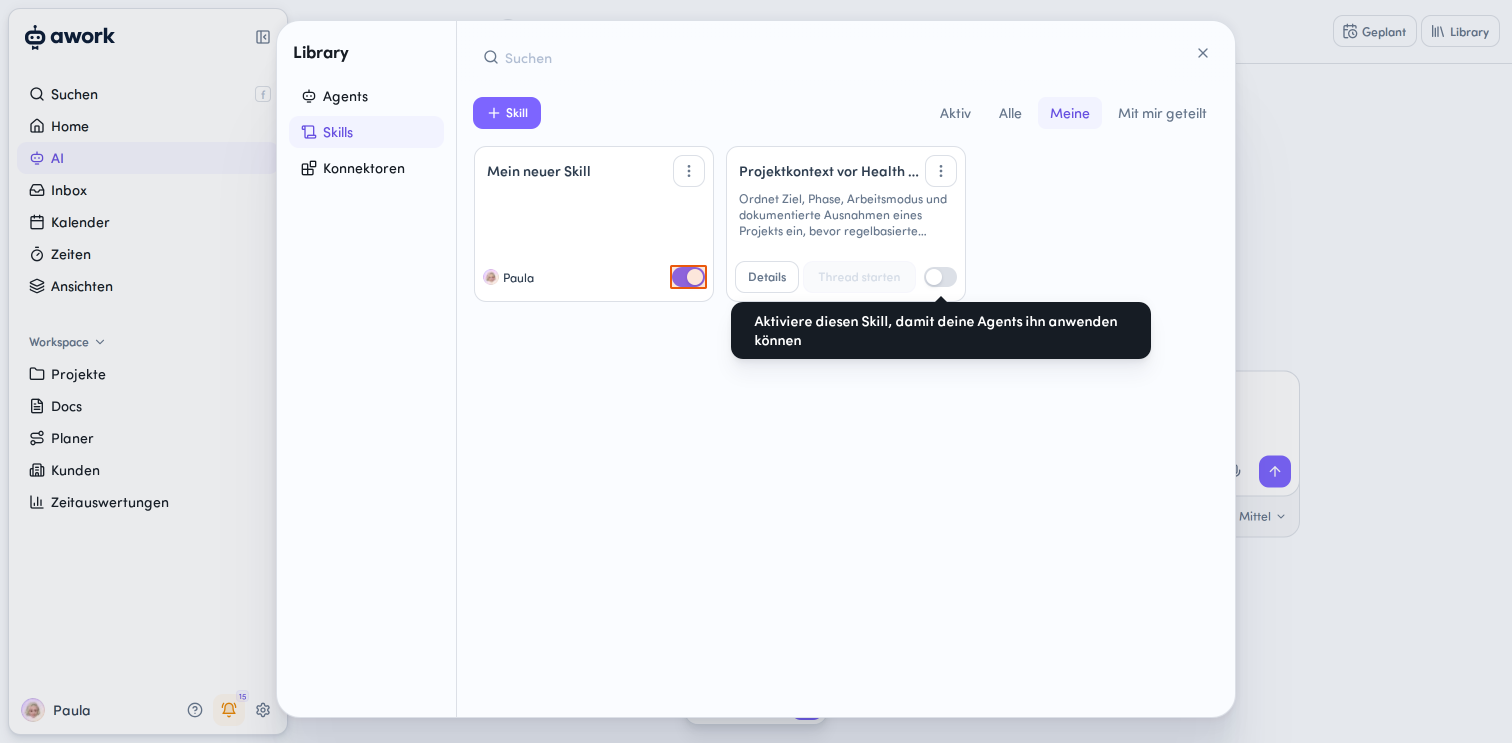
The active skill pool
To avoid having an agent consider all available skills for every request, there's an active skill pool.
Skills activated in the pool are automatically considered when a request is processed. The agent checks them against your request and uses a suitable skill if it's relevant.
You can also mention a skill directly in an AI thread. This lets the agent consider it specifically for your request, even if the skill isn't part of the active skill pool.
From the chat menu, click + > Skills in the input area to turn skills on or off for your next message. This selection applies only to that message and doesn't change your message draft or the shared agent configuration.
The menu shows all skills available to the chat, including inactive ones. Availability is kept up to date dynamically based on your access to the workspace Library. Active skills appear in their configured or activation order, while inactive skills are sorted alphabetically.
If you reopen a chat with your own agent, the skill selection from your last message will be restored.
A skill doesn't run automatically just because it's present as context. The agent checks whether a skill is relevant to your request and should be used.
Library skills vs. agent-specific skills
There are two types of skills:
Library skills are reusable and can be shared in the workspace and used by multiple agents.
Agent skills belong to a specific agent. An agent skill can later be detached from the agent and converted into a regular Library skill.
Skills in the Library
A Library skill isn't tied to a specific agent and can be linked to one or more agents. It can also be shared and reused independently.
Agent-specific skills
Skills embedded directly in an agent belong only to that agent. They don't appear in the general Library and are only available to that agent.
Users with edit permissions for the agent can also edit the skill.
An agent skill can later be detached from the agent and converted into a regular Library skill.
Manage an agent's skills
-
In the Library, open the Agents section.
-
Click Details for the agent you want.
-
Open the Skills section.
Here you'll see all the skills assigned to the agent.
Click Öffnen to view a skill's details. From the action menu, you can Bearbeiten, Duplizieren, or Löschen a skill.
Assign skills to an agent
An agent can use multiple skills. You can use both Library skills and agent-specific skills.
- Open the agent details.
- In the Skills section, click the + Hinzufügen button.
- Select Vorhandenen Skill hinzufügen (= Library skill) or Neuen Agent-Skill erstellen (= agent-specific skill).
Embed a Library skill in an agent
- Open the skill details.
- In the Grundlagen > Skill ist Teil von section, use the action menu to select In Agent einbetten.
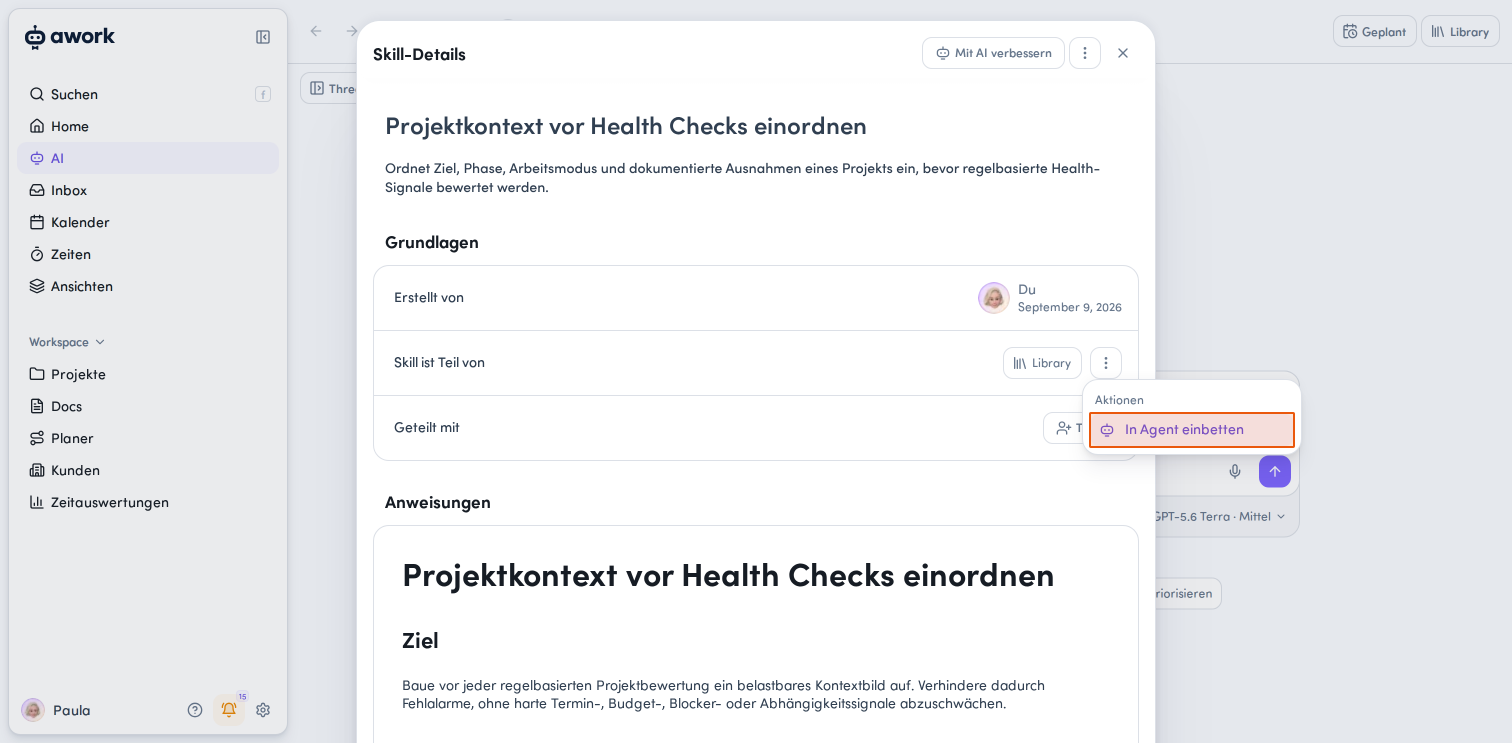
- Select the relevant agent and confirm by clicking the Speichern button.
This turns the skill into an agent-owned capability.
- It will no longer be available in the Library.
- Existing shares will remain saved and will become active again if you move the skill back to the Library.
- You'll only be able to access and edit this skill in the agent configuration.
Keep in mind: If a skill is already linked to an agent, it can only be embedded in that agent.
Tips:
If a skill should only be available to a specific agent, create it directly in that agent. The agent-specific skill won't appear in the general Library.
If a skill should be used by multiple agents, add it to the agents instead of embedding it exclusively.
Make a skill available in the Library
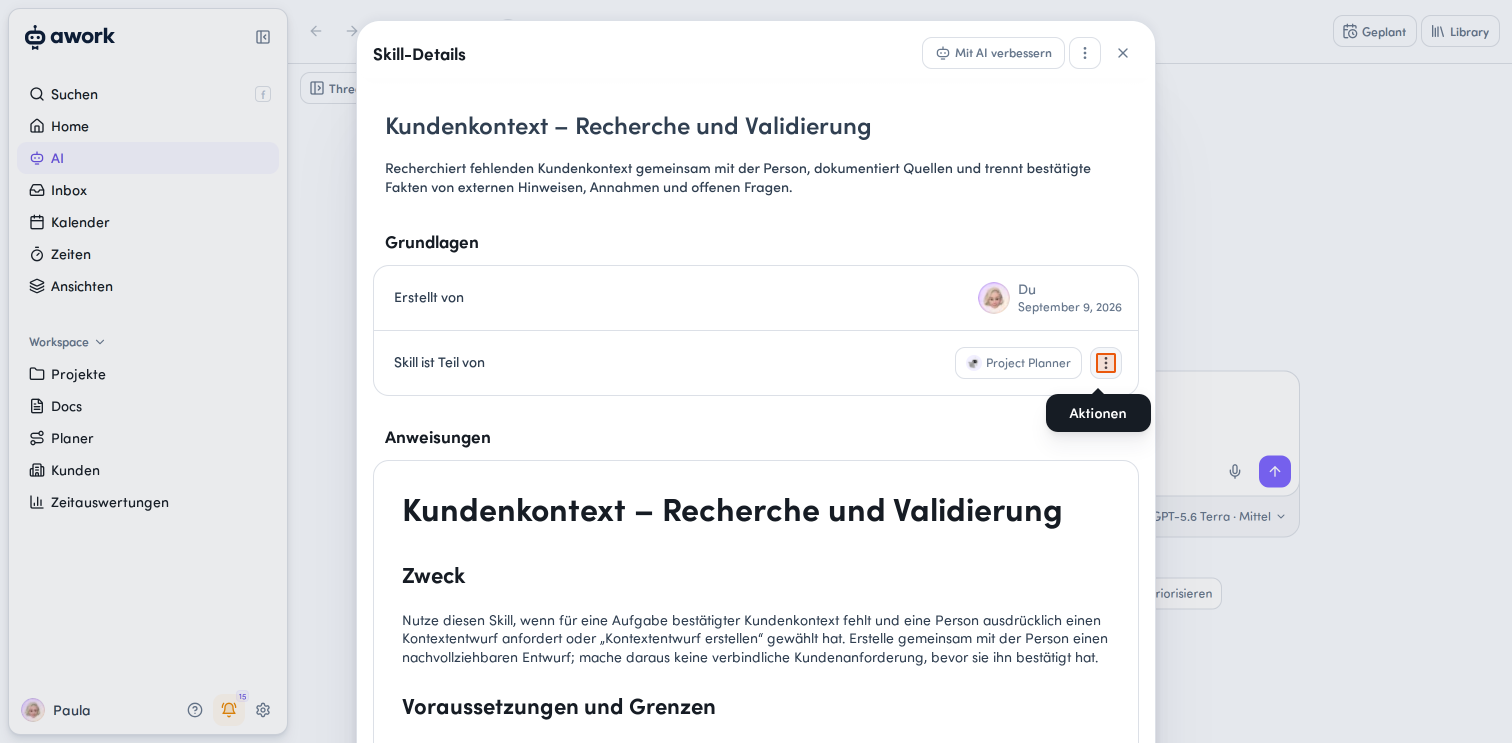
- Open the skill details.
- In the Grundlagen > Skill ist Teil von section, open the Aktionsmenü and select In Library verschieben.
- Click Speichern to confirm.
The skill is now a Library skill. You can open, share, and edit it in the Library.
The skill remains linked to the agent.
Credit usage when using skills
Skills don't have a separate flat credit fee. Neither making a skill available nor loading its instructions is billed as a separate chargeable operation.
Credits are used for the AI work the agent performs when using the skill. A short skill with just a few steps generally uses fewer credits than a more extensive research skill. The number of skills used alone isn't a measure of credit usage.
So there's no fixed rate such as "one skill call costs X credits." Credit usage depends on factors such as the model used, the input and output, caching, the conversation context, and the number of processing steps. As a result, the same task can use different amounts of AI credits.
Standalone Library skills and skills integrated into an agent don't inherently have different costs. Both use the same mechanism for loading skills.
Best practices and troubleshooting
- A skill isn't being used automatically: First, check whether the skill is included in the agent's active skill pool. You can also mention the skill directly in the AI thread. This prompts the agent to check whether it's relevant to your request, even if it isn't included in the active skill pool.
- You want a skill to be available to just one agent: Create the skill directly on the agent you want. This keeps it limited to that agent and prevents it from appearing in the general Library.
- You want to use a skill with multiple agents: Add the skill to the Library and link it to the agents you want.
FAQ
What is a skill?
A skill is a collection of instructions that describes how to perform a particular task, procedure, or routine.
Does a skill run automatically when I mention it?
No. When you explicitly mention a skill, the agent checks whether it's relevant to your request and can use it if appropriate.
What is the active skill pool?
The active skill pool contains the skills an agent takes into account by default when it runs.
Can an agent use multiple skills?
Yes. An agent can use multiple skills from the Library as well as agent-specific skills.
Can skills include files?
Yes. Files such as PDFs can be added as a knowledge base for a skill.
What's the difference between a Library skill and an agent skill?
A Library skill isn't tied to a specific agent and can be used by multiple agents. An agent skill belongs directly to a single agent and is only available there.
Can I link a skill to multiple agents?
Yes. Library skills can be linked to multiple agents.
Can saved secrets be viewed later?
No. Saved API keys and other secrets can't be displayed again. You can delete them and add them again if needed.
Is there versioning for skills?
No. Skills don't currently have versioning.
Is credit usage different for Library skills and skills integrated into an agent?
No. Standalone Library skills don't inherently use more AI credits than skills linked to a specific agent. Usage depends on the actual AI activity, especially the model, tokens, and processing steps.
 Powered by happysupport.ai