
New Planned Effort Hierarchy
Track planned effort consumption across your project hierarchy in Project Time, showing planned versus tracked time at every level.
New: Planned values now follow a clear hierarchy, starting with the project budget and flowing through list planned effort down to individual tasks and subtasks. Subtasks consume the planned effort from their parent task, eliminating double counting. The comparison between planned and tracked effort is visible and traceable at all levels in Project > Time.
For existing workspaces created before November 2025, there's temporarily an option available to disable the new logic.
Key Benefits and Use Cases
-
No double counting by "consuming" effort along the hierarchy instead of adding it up
-
Transparent comparison of planned and tracked effort at all levels in Project > Time
-
Flexible planning approach through top-down distribution or bottom-up derivation
How the New Planned Effort Hierarchy Works
How It Used to Work
-
Every task had a planned value; there was no connection between parent and subtasks
-
Planned values were added up; the sum gave you the total planned time for the project
How It Works Now
-
Planned effort is "consumed" along the hierarchy, not added up
-
Subtasks always relate to their parent task's planned effort and consume their share from it
-
Project > Time shows you at each level what's planned, how much is distributed to subtasks, and what's been tracked
Tip: If you want to understand why totals are changing, first check whether subtasks have "pulled" planned effort from their parent task.
How to Set Planned Values in awork
What You See When Setting a Planned Value
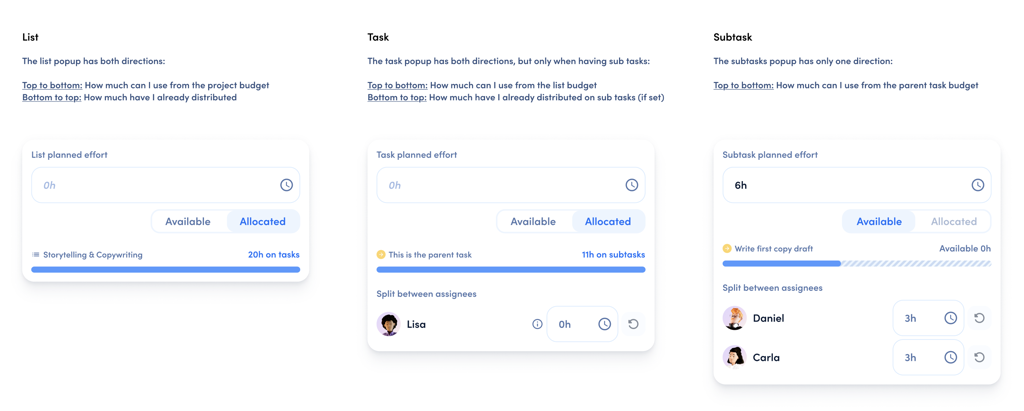
When you set a planned value, you'll see two indicators:
-
Available (Top-down): Shows how much planned effort is still free at the parent level
-
Assigned (Bottom-up): Shows the planned values already used in the lower-level structure
This way you can either distribute from your overall planned effort downward or derive values upward based on your detailed planning.
Impact on Workload
For parent tasks, workload only counts the portion that hasn't been distributed to subtasks yet.
Manual distribution is possible: you can set an individual workload value per person, even if it differs from the task's planned value (for example, if you mainly plan with parent tasks).
KPIs
There are fewer, clearer KPI blocks in task and project details. The "Planned vs. Tracked" widget consistently follows the hierarchy (no double counting).
Temporarily Disabling This Feature
Existing workspaces can turn off hierarchical evaluation in workspace settings temporarily.
This option has an expiration date. We recommend switching over in the medium term to avoid double counting permanently.
FAQ
Why Is There No Double Counting Anymore?
Because subtasks consume the planned effort from their parent task instead of having parent and subtask planned values added together.
Where Can I See Planned vs. Tracked at Different Levels?
In Project > Time, you can see at each level what's planned, how much is distributed to subtasks, and what's been tracked.
What Do "Available" and "Assigned" Mean?
Available shows how much planned effort is still free at the parent level (top-down). Assigned shows the planned values already used in the lower-level structure (bottom-up).
How Does This Change Affect Workload?
For parent tasks, workload only counts the portion that hasn't been distributed to subtasks yet. You can also set an individual workload value per person, even if it differs from the task's planned value.
Can I Disable the New Logic?
Yes. For existing workspaces, there's temporarily an option to turn off hierarchical evaluation in workspace settings.
 Powered by happysupport.ai